1.BasicApp01
<textview> 를 활용해 다음과 같은 화면 만들어보기

▼actuvity_main.xml 코드
<?xml version="1.0" encoding="utf-8"?>

<androidx.constraintlayout.widget.ConstraintLayout
	xmlns:android="http://schemas.android.com/apk/res/android"
	xmlns:app="http://schemas.android.com/apk/res-auto"
	xmlns:tools="http://schemas.android.com/tools"
	android:id="@+id/main"
	android:layout_width="match_parent"
	android:layout_height="match_parent"
	android:background="#FFEB3B"
	tools:context=".MainActivity">

	<TextView
		android:layout_width="wrap_content"
		android:layout_height="wrap_content"
		android:background="#2196F3"
		android:text="안녕하세요? 반갑습니다."
		android:textColor="#FF0000"
		android:textSize="35dp"
		app:layout_constraintBottom_toBottomOf="parent"
		app:layout_constraintEnd_toEndOf="parent"
		app:layout_constraintStart_toStartOf="parent"
		app:layout_constraintTop_toTopOf="parent" />

</androidx.constraintlayout.widget.ConstraintLayout>
2. BasicApp02
<textview> 2개를 활용해 다음과 같은 화면 만들어보기

▼actuvity_main.xml 코드
<?xml version="1.0" encoding="utf-8"?>
<androidx.constraintlayout.widget.ConstraintLayout
	xmlns:android="http://schemas.android.com/apk/res/android"
	xmlns:app="http://schemas.android.com/apk/res-auto"
	xmlns:tools="http://schemas.android.com/tools"
	android:id="@+id/main"
	android:layout_width="match_parent"
	android:layout_height="match_parent"
	android:background="#FFEB3B"
	tools:context=".MainActivity">

	<TextView
	android:layout_width="wrap_content"
	android:layout_height="wrap_content"
	android:background="#3F51B5"
	android:text="Hello World!"
	android:textColor="#F44336"
	android:textSize="40dp"
	app:layout_constraintBottom_toBottomOf="parent"
	app:layout_constraintEnd_toEndOf="parent"
	app:layout_constraintStart_toStartOf="parent"
	app:layout_constraintTop_toTopOf="parent" />

	<TextView
	android:id="@+id/textView"
	android:layout_width="wrap_content"
	android:layout_height="wrap_content"
	android:layout_marginTop="200dp"
	android:background="#F44336"
	android:text="Good Bye~"
	android:textColor="#8BC34A"
	android:textSize="40dp"
	app:layout_constraintBottom_toBottomOf="parent"
	app:layout_constraintEnd_toEndOf="parent"
	app:layout_constraintStart_toStartOf="parent"
	app:layout_constraintTop_toTopOf="parent" />

</androidx.constraintlayout.widget.ConstraintLayout>
3. BasicApp03
주요 구현 조건
- 구조 (Vertical)
- 전체 화면을 LinearLayout 세로 방향(vertical)으로 설정하고, 4 : 4 : 2 비율로 공간을 나눈다.
- 상단 & 하단 (TextView)
- 가장 위와 아래 칸은 각각 TextView를 배치하고, 글자가 칸의 정중앙에 오도록 정렬(gravity)한다.
- 중단 (Layout Overlap)
- 중간 칸은 FrameLayout을 사용하여 텍스트 위에 알림 배지를 겹친다.
- 배지 위치: 알림 배지(이미지와 숫자)는 부모 영역의 **우측 상단(right|top)**에 배치되도록 설정한다.
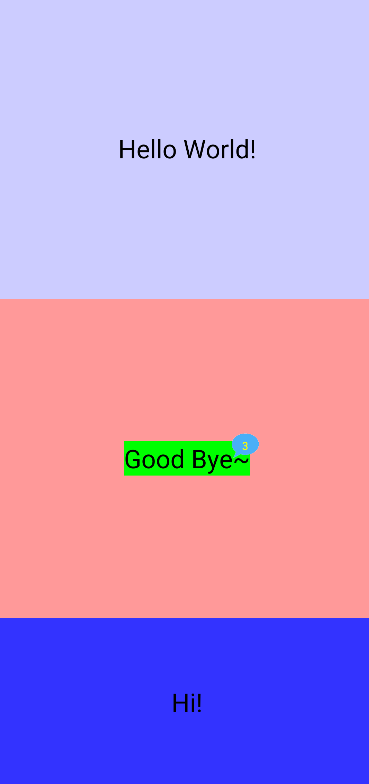
▼actuvity_main.xml 코드
<?xml version="1.0" encoding="utf-8"?>

<androidx.constraintlayout.widget.ConstraintLayout
	xmlns:android="http://schemas.android.com/apk/res/android"
	xmlns:app="http://schemas.android.com/apk/res-auto"
	xmlns:tools="http://schemas.android.com/tools"
	android:id="@+id/main"
	android:layout_width="match_parent"
	android:layout_height="match_parent"
	tools:context=".MainActivity">

	<LinearLayout
		android:layout_width="match_parent"
		android:layout_height="match_parent"
		android:background="#FFFF00"
		android:orientation="vertical"
		android:weightSum="10" >

		<TextView
			android:id="@+id/textView"
			android:layout_width="match_parent"
			android:layout_height="wrap_content"
			android:text="Hello World!"
			android:textSize="28sp"
			android:textColor="#000000"
			android:background="#ccccFF"
			android:layout_weight="4"
			android:gravity="center"
			/>

		<LinearLayout
			android:layout_width="match_parent"
			android:layout_height="wrap_content"
			android:background="#FF9999"
			android:layout_weight="4"
			android:gravity="center"
			android:orientation="vertical">

		<FrameLayout
			android:layout_width="wrap_content"
			android:layout_height="wrap_content"
			android:layout_gravity="center">

			<TextView
				android:layout_width="wrap_content"
				android:layout_height="wrap_content"
				android:text="Good Bye~"
				android:textSize="28sp"
				android:textColor="#000000"
				android:background="#00FF00"
				android:layout_gravity="center"
				android:layout_margin="10dp"/>

			<FrameLayout
				android:layout_width="30dp"
				android:layout_height="30dp"
				android:layout_gravity="right|top">

				<ImageView
					android:layout_width="match_parent"
					android:layout_height="match_parent"
					android:src="@drawable/talk_bg"
					android:layout_gravity="center"/>

				<TextView
					android:layout_width="wrap_content"
					android:layout_height="wrap_content"
					android:layout_gravity="center"
					android:text="3"
					android:textColor="#FFFF00"
					android:textSize="12sp" />

			</FrameLayout>
		</FrameLayout>
	</LinearLayout>

	<TextView
	android:layout_width="match_parent"
	android:layout_height="wrap_content"
	android:text="Hi!"
	android:textSize="28dp"
	android:textColor="#000000"
	android:background="#3333FF"
	android:layout_weight="2"
	android:gravity="center"/>

</LinearLayout>

</androidx.constraintlayout.widget.ConstraintLayout>'[Android] 안드로이드' 카테고리의 다른 글
| [ 안드로이드 기본 ] 간단한 Thread 테스트 (0) | 2026.04.15 |
|---|---|
| [ 안드로이드 기본 ] 간단한 Handler 테스트 (0) | 2026.04.10 |
| [ 안드로이드 기본 ] 간단한 게임화면 구현 _ ScreenChange (1) | 2026.04.10 |
| [ 안드로이드 기본 ] Toast - setOnClickListener() , LogCat - 로그출력 (0) | 2026.04.10 |
| [ 안드로이드 기본 ] 버튼 setOnClickListener() 활용, 이미지뷰 동적 변경, 액티비티 생명주기(LifeCycle) (0) | 2026.04.09 |